- New naming
ASUS Wireless Product Model Name Convention
Here we try to explain the nameing convention of ASUS wireless product families:
How to configure ASUS DDNS service with ASUSWRT
How to configure ASUS DDNS with ASUSWRT firmware
DDNS (Dynamic Domain Name System) is a service that allows clients to access a specific network device through a registered domain name. This is especially useful when the target network device has a dynamic public IP address.
All ASUS wireless router is embedded with ASUS DDNS service, and new models in these years come with ASUSWRT firmware. The steps to configure DDNS service remain pretty much the same:
1. From your Mac or PC, point your browser to e.g. 192.168.1.1, login to the ASUS wireless router and enter the configuration page.
2. Click [WAN] on the first level menu (on the left-hand side):
1. From your Mac or PC, point your browser to e.g. 192.168.1.1, login to the ASUS wireless router and enter the configuration page.
3. Click [DDNS] on the second level menu (on the top).
4. Click 'Yes' to 'Enable the DDNS Client'.
5. Leave the 'Server' as 'WWW.ASUS.COM'.
6. Enter a 'Host Name' for your wireless router, e.g. if you enter 'alice', you should be able to access your router with 'alice.asuscomm.com'.
7. Click [Apply] to save your configuration and it's done. Wait for a few hours for the hostname to propagate through DNS system.
Please note that in order for ASUS DDNS service to work correctly, you need to let it get an public IP address. If your wireless router sit behind any other gateway or firewall, it may get a private IP (192.168.x.x, 10.x.x.x or 172.16.x.x) in this case and the DDNS service will not work.
Online demo site: http://ec2-54-202-251-7.us-west-2.compute.amazonaws.com:8080/Advanced_ASUSDDNS_Content.asp
What is ASUSWRT?
About Asuswrt:
Asuswrt is a unified firmware developed by Asus for use in their recent routers. The firmware was originally based on Tomato-RT/Tomato-USB, but has since seen many changes. Asus started using this new firmware with their recent routers like the RT-N66U, but they also started moving other routers to this new firmware, like the DSL-N55 or the RT-N56.
Project homepage: https://github.com/RMerl/asuswrt-merlin/wiki/About-Asuswrt
Being mostly based on GPL code, almost all the source code and all necessary build tools is available from their website. There are a few proprietary components that are closed source (like the wireless drivers from Broadcom/Ralink). In these cases, Asus includes binary-only versions of these files. In the end, their GPL release includes everything needed to completely recompile a working firmware, with the exact same features as found in their firmware releases.
Video Tutorial:
One big advantage of Asus going with a unified firmware is that they have one single code base for all their supported routers. That way, bugfixes for one device can automatically be applied to all other supported devices. Same when they start adding new features (such as AiCloud), it's easier for them to support multiple routers at the same time with these news features. And finally, it means that support for a router does not die the minute a newer router replaces it on the market. The RT-N16 still gets updated as frequently as the RT-N66U, for instance (as they share very similar hardware).
[c|net] RT-AC87U Awarded Best Wireless Router of 2015
The hefty price aside, the Asus AC2400 RT-AC87U is the most complete 802.11ac router to date, capable of satisfying all your home networking needs.
The Good The Asus AC2400 RT-AC87U Dual-band Wireless Gigabit Router has superfast Wi-Fi speed and an extremely long range. The router has the the ability to keep viruses and malware from entering your home network, monitor Internet traffic in real time, and many other helpful features.
The Bad The router is expensive, and you need compatible Wi-Fi devices to benefit from its fast performance. The USB 3.0 port is awkwardly placed and the interface doesn't include client names in the IP reservation list.
The Bottom Line The hefty price aside, the Asus AC2400 RT-AC87U is the most complete 802.11ac router to date, capable of satisfying all your home networking needs.
What's DDNS
A good guide for DDNS and more
This is much easier to understand, read full text at:
http://advancedhomeserver.com/dynamic-dns-ddns-and-a-little-more/
So what’s DDNS?
DDNS is a technique that keeps on top of the IP address your ISP assigned to you. Periodically, and fairly often, a program runs to find out what your ISP provided internet IP address is at this moment. Then a private company somewhere on the internet is contacted and associates your current IP address with an internet name you provided to them. The internet name is a composite of a name you chose and their actual domain name. When someone on the internet enters that name in a browser, they’re talking to you.
For example, Asus offers a free DDNS service for buyers of some of the products they sell. I own an Asus router and use their DDNS service. Within the router, I turned the DDNS feature on and entered a name. Asus agreed the name was unique and established the link within a couple of seconds. The router relays my current IP address to Asus DNS servers several times a day. I now have an accessible internet presence at ________.asuscomm.com.
Behind the scene, the internet DNS service sees the ‘asuscomm.com’ part of the name and routes the search to the Asus DNS servers. Asus finishes the job and matches ________.asuscomm.com to whatever my ISP has decided my IP address should be at that moment. From this, the internet knows where to find me.
How to re-use your DDNS hostname on new ASUS device
Having the merit of being very easy to setup, there are still some concern regarding ASUS DDNS service about not able to re-use existing hostname on another ASUS device.
ASUS DDNS service works based on MAC address, once you have your first router registered a favorite hostname, that will be reserved for the router for long than enough. What if you bought a new ASUS router and want to re-use your favorite hostname? You can do the following:
ASUS DDNS service works based on MAC address, once you have your first router registered a favorite hostname, that will be reserved for the router for long than enough. What if you bought a new ASUS router and want to re-use your favorite hostname? You can do the following:- Before your old ASUS router retire, use it to register a new hostname.
- The original hostname you prefer will become available after 12 hours.
- Then you can use your new ASUS router to register your preferred hostname.
Configure ASUS DDNS Service on RT-AC66U
AiDisk is a feature that built-in to every ASUS wireless devices, it allows you to create an FTP server with just a few clicks.
1. Use any browser on your PC to connect to your ASUS router, default IP address would be http://192.168.1.1.
2. Login to the router with default username: admin and password: admin.
3. Select Network Map from the menu on the left, make sure the Internet status says that you are connected and get a public WAN IP (not some private IP like 192.168.x.x):
2. Login to the router with default username: admin and password: admin.
3. Select Network Map from the menu on the left, make sure the Internet status says that you are connected and get a public WAN IP (not some private IP like 192.168.x.x):
5. In the WAN - DDNS settings page, select Yes to Enable the DDNS Client.
6. Use the WWW.ASUS.COM server by default and choose a name for your FTP site (e.g. myftp), enter it to the Host Name input box.
How to configure ASUS AiDisk and DDNS Service
Configure ASUS DDNS Service through AiDisk
AiDisk is a feature that built-in to every ASUS wireless devices, it allows you to create an FTP server with a few clicks.
Use any browser on your PC to connect to your ASUS router, default IP address would be http://192.168.1.1, login with default username: admin and password: admin.
First select AiDisk from the menu on the left, and then click on the GO (or Set Again) button to proceed.
1. Setup FTP account:
Select "admin rights" radio button from the list, and the admin account setting will appear. Provide a password for the admin account and click Next.
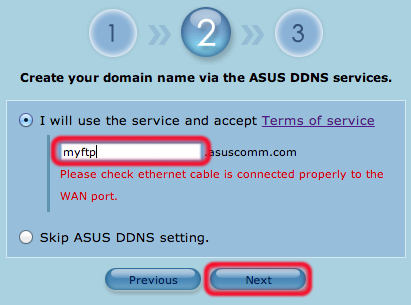
2. Choose a hostname:
The next page will have an input box prior to the ".asuscomm.com" domain name, choose a name for your FTP site and enter to the box, then click Next.
At this point, the router will send a request to the ASUS DDNS service, which will bind your router with the hostname you choose.
If the hostname is already taken, the router will prompt for another hostname.
3. Done and ready to serve.
Now you can access your FTP site with the hostname you choose, e.g.:
AiDisk is a feature that built-in to every ASUS wireless devices, it allows you to create an FTP server with a few clicks.
0. Connect to the web-based console of your router
Use any browser on your PC to connect to your ASUS router, default IP address would be http://192.168.1.1, login with default username: admin and password: admin.
First select AiDisk from the menu on the left, and then click on the GO (or Set Again) button to proceed.
1. Setup FTP account:
Select "admin rights" radio button from the list, and the admin account setting will appear. Provide a password for the admin account and click Next.
2. Choose a hostname:
The next page will have an input box prior to the ".asuscomm.com" domain name, choose a name for your FTP site and enter to the box, then click Next.
If the hostname is already taken, the router will prompt for another hostname.
3. Done and ready to serve.
Now you can access your FTP site with the hostname you choose, e.g.:
ftp://myftp.asuscomm.com
ASUS EA-N66 at CES 2012
By Michael Kwan, January 12, 2012 @ 3:21pm
Asus also unleashed a funky EA-N66 dual-band wireless Ethernet adapter. It sorta looks like a transporter deck you can step into. We doubt Asus is releasing those to the public yet. The EA-N66 provides the same 450Mbps bandwidth but only on either the 2.4GHz or 5GHz channels. You can also set it as a repeater or an access point node for growing your network. The RT-N66U will sell for around $179, while the EA-N66 will be $59 when they are released later this month.
Not all routers are made alike, and they don’t all have to be boring grey boxes that get hidden away in the corner of a room. Asus showed off one of the latest additions to its wireless router line at CES 2012 and it turns out that its beauty goes further than skin deep.
Yes, that glossy black surface is nice and they’ve done an interesting job with that “weave” pattern on the top, but the Asus RT-N66U also happens to be really fast. You get dual 450Mbps wireless service, pushing that much bandwidth on both the 2.4GHz and 5GHz channels independently. That combines for 900Mbps of wireless speed.
There are also two high-speed, high-power USB ports on the back that allow you share external drives across your network at up to about 25MB/s, as well as sharing printers and other peripherals. Rounding out the package is a convenient web-based GUI for setup, meaning that you can get your network up and running on your smartphone or tablet if you don’t want to boot up your computer.
Asus also unleashed a funky EA-N66 dual-band wireless Ethernet adapter. It sorta looks like a transporter deck you can step into. We doubt Asus is releasing those to the public yet. The EA-N66 provides the same 450Mbps bandwidth but only on either the 2.4GHz or 5GHz channels. You can also set it as a repeater or an access point node for growing your network. The RT-N66U will sell for around $179, while the EA-N66 will be $59 when they are released later this month.
Not all routers are made alike, and they don’t all have to be boring grey boxes that get hidden away in the corner of a room. Asus showed off one of the latest additions to its wireless router line at CES 2012 and it turns out that its beauty goes further than skin deep.Yes, that glossy black surface is nice and they’ve done an interesting job with that “weave” pattern on the top, but the Asus RT-N66U also happens to be really fast. You get dual 450Mbps wireless service, pushing that much bandwidth on both the 2.4GHz and 5GHz channels independently. That combines for 900Mbps of wireless speed.
There are also two high-speed, high-power USB ports on the back that allow you share external drives across your network at up to about 25MB/s, as well as sharing printers and other peripherals. Rounding out the package is a convenient web-based GUI for setup, meaning that you can get your network up and running on your smartphone or tablet if you don’t want to boot up your computer.
Asus RT-N66U - An Excellent Router You Should Consider Upgrading To
By James Causian
If you are thinking of replacing your existing router for whatever reasons in your connected home or in a small office home office (SOHO) environment, then you should seriously look at the Asus RT-N66U as your replacement. If you are not a techie, reading reviews to get a sound judgment to buy a technical network product like a router can sometimes be very daunting and confusing; especially with all the technical jargons thrown into it.
For those of you non techies out there, I would like to make this article as simple as possible so that you will know whether you should buy or not buy Asus RT-N66U router by the end of this article.
What Is The Asus RT-N66U Dual-Band Wireless-N900 Router?
First of all, what is the Asus RT-N66U? In a gist, it is a simultaneous dual-band three-stream "N-900" router with one Gigabit WAN port. The "N-900" indicates that the RT-N66U can support 450 Mbps link rates when both radios are set to 20/40 or 40 mHz channel bandwidth.
Duo band allows you to split your internet usage to maximize usage. One band will be used for basic internet usage such as web surfing, email and file loading while the other band will be used for HD content streaming such as watching movies, listening to music and online gaming.
The Asus RT-N66U also has four switched Gigabit LAN ports with two USB 2.0 ports that support both drive and printer sharing. It is also designed to operate up to 300,000 Internet client data sessions and is IPv6 support. You also have up to 8 multi-user SSIDs with parental controls. Knowing that sometimes it can be daunting for the non-technical user to set-up a router, Asus also makes it easy for you to set-up the RT-N66U with its ASUSWRT dashboard user interface.
What Are The Advantages Of The Arsus RT-N66U?
- The RT-N66U with the many additional improvements in it was built upon the hugely successful Asus RT-N56U resulting in a better product with better features and performance than its predecessor which was already an excellent product
- It is one of the fastest consumer class routers in its price range in the market today. In terms of performance, reviewers and testers have reported that the Asus RT-N66U beat rivals like the Linksys E4200, ASUS RT-N56U, Cisco E4200V2, Netgear WNDR3800 etc flat!
- Expanded coverage - if your house or office is multi levels - the RT-N66U comes with three detachable external antennas which allow omnidirectional wireless signal coverage to not only reach devices horizontally but also vertically
- Easy Setup and Customizability - it is very easy to setup the RT-N66U with the ASUSWRT dashboard user interface mentioned earlier as you can set up your network right out of the box and optimize it through the dashboard. Management is also made easy with robust parental controls, real-time traffic monitor and Quality of Service done through the dashboard
- If you are in a hurry or need to download many files at one go - the RT-N66U lets you simultaneously download files directly to USB storage devices and connect a printer in the other port via its two built-in USB 2.0 ports
- Are you running intensive peer-to-peer applications? If you are then you can get up to a fantastic 300,000 simultaneous sessions!
- The Asus RT-N66U is very solidly build.You have a good feeling with this router - knowing that it is built to last
Should you buy the Asus RT-N66U?
Buying a router is not an everyday affair and neither do you change routers every month. In fact many people use their routers for years and only change them when they break down or they need to make use of the current technology that their router cannot support. As such, if as little as half of those points highlighted above especially with regards to speed, workload and coverage meet your requirements, then it would definitely be worth your money to invest in the Asus RT-N66U router.
However it you are thinking of buying a model with a lesser specifications that may save you $50 or less, then the question is why buy the lesser model (especially so if you are in a SOHO environment)? Assuming that you would use a router for 2 years, it may only save you less than $5 a month per year with that lesser model; which is really not much for a lot of people.
Hence when you buy the Asus RT-N66U, you are actually buying into the future. You may not need to change the router again if unexpected needs and work load turn up because the Asus RT-N66U router has already the capability and capacity to handle that. Spending a few dollars more on a good router like the Asus RT-M66U now will actually give you more value in the long run. As such it may be wise consider the longer term.
Act now and enjoy the benefits immediately. Click on this link to buy the Asus RT-N66U.
Article Source: http://EzineArticles.com/?expert=James_Causian
ASUS RT-N66U
Dual-Band Wireless-N900 Gigabit Router
- 2.4 GHz and 5 GHz Concurrent Dual-Band Transmissions for Strong Signal Strength and Ultra-Fast Connection Rates up to 900Mbps
- Gigabit Ethernet Ports for the Fastest, Most Reliable Internet Performance
- Download Master for Wireless Data Storage and Access to Router-Connected USB Storage Devices
- Expanded Wireless Coverage with Detachable High-Powered Antennas
- File Sharing, Printer Sharing, and 3G Sharing via Two Multi-Functional Built-in USB Ports
- ASUSWRT Dashboard UI for Easy Setup, Signal Monitoring, and Network Application Control
Incredible Performance with Incredible Control
The ASUS RT-N66U dual-band wireless-N900 gigabit router delivers incredible performance and coverage range. With new ASUSWRT UI, quickly setup your network, customize user access, and monitor signal strength. Following the award-winning RT-N56U, the RT-N66U increases Wi-Fi speed for both 5 GHz and 2.4 GHz transmission by 50% up to 900Mbps that makes it ideal for bandwidth demanding tasks such as 3D HD video steaming, multiplayer gaming, USB hard drive file sharing, and USB connected printer sharing. Built-in Wi-Fi amplifiers make the RT-N66U the perfect wireless router for larger, multi-level homes and buildings with signal range that reaches virtually any area.
Whether you’re a tech-savvy enthusiast or a first-time user, the RT-N66U is exceptional easy to use with CD-free, Quick Installation Setup (QIS) that lets you plug-n-surf right out of the box and connect PCs, smartphones, tablets, and other wireless devices quickly. Thanks to its refined interface tools, you get control like never before, letting you monitor signal strength, setup parental settings, and other useful functions in a robust yet intuitive way.
Designed for Class-Leading Speed and Range
Designed with the latest in networking technology, the RT-N66U delivers exceptionally fast wired and wireless connectivity. What’s more, it comes with a powerful detachable Wi-Fi antenna to further extend wireless range.
Dual-Band Connectivity for Lag-Free Entertainment
Delivering both 2.4 GHz and 5 GHz concurrent bands up to 450Mbps and 450Mbps respectively, the RT-N66U has a total speed of up to 900Mbps connectivity to provide speed with stability. Perform basic internet tasks like Web browsing and file downloading under the 2.4 GHz band, while also simultaneously streaming 3D HD content and other demanding applications smoothly on the 5 GHz band.
Optimized and Reliable Wireless Coverage via Ai Radar
ASUS Ai Radar intelligently strengthens connections to wireless devices. With high-powered amplification and beam package, it provides optimized signals in any direction with better coverage to improve data throughput.
Easy Setup Through Your Tablet, Smartphone, or PC
With the RT-N66U, setup is simple. Simply power and connect the router and then open a bowser on a Wi-Fi-enabled device like a laptop or tablet. You will be taken to a setup page with a prompt to enter the ID/password from your Internet provider and that’s it! Now setting up your network is easier than ever.
Powerful functions, easiest management
With the ASUSWRT Dashboard UI, setup, monitor, and control network applications all in one intuitive area. The whole new dashboard interface lets you manage all clients and settings on a single graphical interface and provides 1-click updates.
Optimize Your Network for You
Do you game a lot, or spend most of your time streaming videos? Whatever your planned use is, the RT-N66U has a Quality of Service (QoS) that lets you select how much bandwidth is prioritized for virtually any task. Plus, the traffic monitor allows you to check your Web usage in a clear and graphical interface.
Two Multi-Functional Built-in USB ports
Featuring connectivity to devices, FTPs, SAMBA, UPnP AV servers, and DLNA support, the RT-N66U makes sharing and networking easier with two built-in USB ports. Download HTTP, FTP, and P2P files to a router-connected USB storage device all day without the need of PC. Additionally, the twin USB ports allow network printer and file server connections, so you perform multiple tasks at once.
Download and Stream From Anywhere
Download Master and DLNA server lets you download and play multimedia files stored on a router-attached USB storage device on DLNA-compatible devices such as PC, tablet, PS3, XBOX, and Internet TV. Download Master can also download files while a PC is turned off, and allows you to manage and monitor download status remotely.
Powerful Online Multitasking up to 300,000 Data Sessions
Support f or a massive data pipeline of up to 300,000 data sessions means the RT-N66U has around 20 times the networking capacity of other conventional routers for exceptionally smooth performance.
Separate and Secure Wi-Fi Network via Guest Network Access
The RT-N66U supports up to three wireless networks over the 2.4 GHz band and three over the 5 GHz band, so it can protect computers from any unauthorized access, hacking and virus attacks. The parental control allows you to set up your kids' computer access times.
VPN Server Enabled
Easily set up a VPN server to surf the Web and access data—no matter where you are. Featuring MPPE encryption, your data transmission will be secure and confidential.
Flexible Installation with Versatile Design
Wall-mountable, the RT-N66U fits nearly any space in the home or office.
- Actual data throughput will vary from network conditions and environmental factors.
- All specifications are subject to change without notice. Please check with your supplier for exact offers. Products may not be available in all markets.
- PCB color and bundled software versions are subject to change without notice.
- Brand and product names mentioned are trademarks of their respective companies.
訂閱:
文章 (Atom)